
This guide will walk you through troubleshooting your ScanAvenger barcode scanner, along with including instructions on how to program it.


Beep Codes:
- 1 Beep: barcode is being read correctly and is being stored or outputted to a device it’s connected to
- 3 Beeps: scanner is disconnected from all devices
- 5 Beeps: scanner is low battery
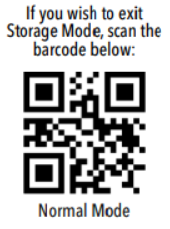
If you can verify a ScanAvenger is not connected to a device, and is providing 1 beep but not outputting, scan the barcode to remove the scanner from storage mode and put it into normal mode.
Lights: blue on top means paired/pairing (bluetooth), red means charging
USB (Cable)
USB-Dongle (WiFi)
Bluetooth